By Mina Kouch
Published: March 09, 2026 | updated: March 11, 2026
Mina is the Marketing Content Manager at Sandfield, specialising in digital strategy and tech-driven content.
February 2026 Portal feature updates

By Mina Kouch
Published: March 09, 2026 | updated: March 11, 2026
Mina is the Marketing Content Manager at Sandfield, specialising in digital strategy and tech-driven content.
Quick Summary
The February 2026 Crossfire Portal update delivers a new icon-based dashboard, consolidated order screens, and enhanced warehouse management tools. Available from 24 February 2026.
The Crossfire Customer Portal is a secure, cloud-based self-service tool that provides businesses with real-time visibility and control over their EDI and API integrations. It acts as a centralised hub where suppliers, wholesalers, and retailers can monitor and manage the electronic exchange of supply chain documents - such as orders, invoices, and shipments - in one place.
How it transforms operations:
Operational transparency: Track transaction statuses and order progress in real time across all trading partners.
Increased efficiency: Replace manual emails and spreadsheet tracking with automated data flows, reducing admin overhead and human error.
Faster troubleshooting: Spot and fix data errors instantly without waiting for support tickets or email chains.
Universal connectivity: Easily create orders and print compliant labels for trading partners who aren't yet EDI-capable.
Building on this foundation of visibility, we’ve redesigned the portal experience to reduce clicks, clear away clutter, and put the most critical information exactly where you need it.
Brand new dashboard
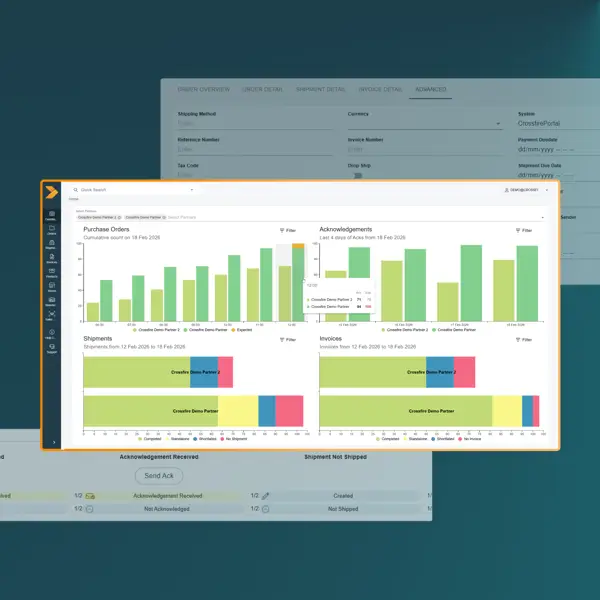
Make faster, more informed decisions with a clearer, data-driven overview of your operations.
Icon-based navigation replaces clickable text links with icon buttons, creating a cleaner, more action-oriented interface. Spot critical issues at a glance; when an urgent shipment is delayed or an invoice needs approval, you'll see it immediately without hunting through text menus.
Enhanced table controls give you full control of your data view across Shipments, Products, and Invoices. Filter, pin, resize, group, and hide columns to see exactly what matters to you. Warehouse teams can pin serialised number columns, while finance can filter invoices by payment status – everyone sees what matters to them, instantly.
Advanced tab provides dedicated access to detailed information when you need it. Access detailed tracking data without leaving the page; check carrier details, view full address breakdowns, or audit order history in one click instead of three.
Redesigned Order screen
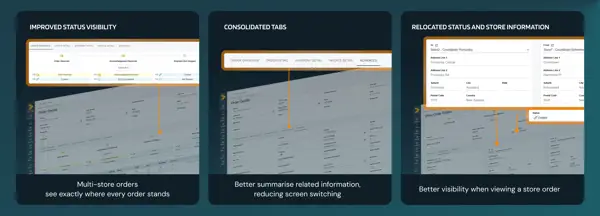
Navigate faster and complete tasks with fewer clicks. When a customer calls asking about their order status, you'll see order details, shipment tracking, and invoice information on one screen – no more switching between tabs while they're on hold.
Redesigned Shipments page
Track every detail without switching screens. Perfect for handling customer queries about B2B shipments with serialised products. When a retailer calls about missing stock, you can instantly confirm which serial numbers were dispatched, when they shipped, and their current location, all without opening multiple screens.
Redesigned Invoices page
Resolve billing disputes faster. When a customer questions an invoice, you'll see the originating order, delivery address, and any address corrections in one view – giving you the full context to answer their query on the first call.
Quick comparison: Before vs. After
|
Feature |
Previous Portal |
February 2026 Update |
|
Navigation |
Text links & basic tables |
Icon buttons & customisable columns |
|
Order view |
Data split across tabs |
Consolidated single view |
|
Shipments |
Standard tracking |
Serial numbers & full details in one view |
|
Invoices |
List view |
Full context with origin & address details |
|
Admin |
General permissions |
Granular, vendor-specific controls |
Beyond the interface updates, we've improved the infrastructure that keeps your operations running smoothly:
Inventory and warehouse management: Onboarding a new warehouse? Upload all location codes in one go instead of manual entry. Plus, Australia Post address validation catches typos before dispatch – preventing costly failed deliveries and customer frustration.
Admin controls and permissions: Give your team the access they need, nothing more. Set 'Resend EDI' permissions by vendor so warehouse staff can resend to Partner A but not Partner B – reducing errors while maintaining control.
Modernised training and infrastructure: New team members follow real workflows, not abstract feature lists; they're productive in days, not weeks. Behind the scenes, Azure Key Vault integration adds an extra layer of security for your sensitive data.
Existing customers: Log in to your Portal to explore the new features and check out the release notes for full details.
Questions or feedback? We're here to help. Our support team is available to walk you through the updates and ensure you're getting the most out of the Crossfire Portal.
New to Crossfire? Get in touch to book a demo and see how the Crossfire Portal can give you total visibility and control over your operations.






© Copyright 2026 Sandfield Associates Limited. All Rights Reserved. Terms of Use | Privacy Policy