By Mina Kouch
Published: July 08, 2026 | updated: August 19, 2026
Mina is the Marketing Content Manager at Sandfield, specialising in digital strategy and tech-driven content.
July 2026 Portal feature updates

By Mina Kouch
Published: July 08, 2026 | updated: August 19, 2026
Mina is the Marketing Content Manager at Sandfield, specialising in digital strategy and tech-driven content.
Now live in the Crossfire Portal, the PDF-to-Order tool is an AI-powered feature that instantly maps PDF orders to your ERP or IMS in three steps. Your retailers keep emailing orders exactly as they do today - you upload the PDF into the portal and Crossfire’s AI agent extracts, maps, and stages it for a one-click push into your ERP or IMS system.
If your team is spending part of every day copying order or invoice details from emailed PDFs and retyping them into your ERP or IMS, you already know what it costs: time, focus, and the occasional costly typo that only surfaces when a customer calls.
PDF-to-Order is Crossfire's answer to that bottleneck. It's now live in the Portal, and it works when your system is already integrated to Crossfire.
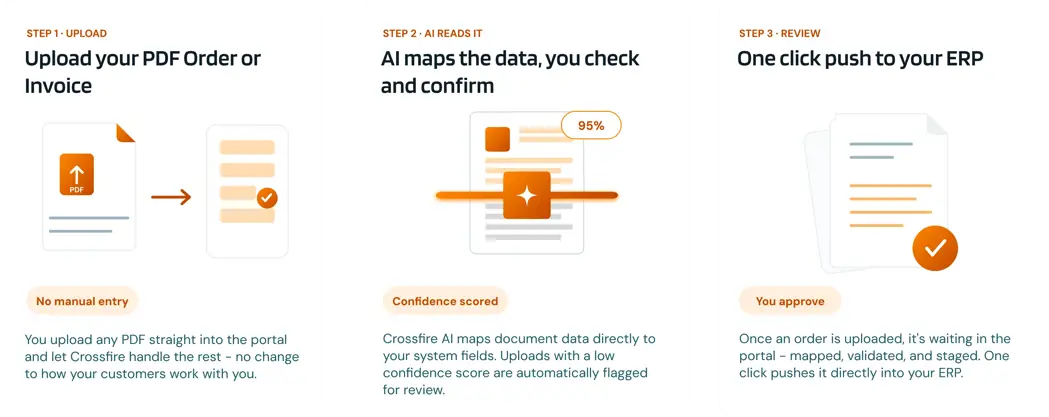
Upload straight into the portal. You upload the PDFs into Crossfire, and bulk uploads are supported for busier days.
Confidence scoring and error flagging. Each document is scored on extraction accuracy. Low-confidence uploads are held for review rather than pushed through - keeping your ERP data clean.
Human approval before ERP sync. No order reaches your ERP system without a manual sign-off. The portal validates against the original PDF, not auto-calculated totals, so discrepancies surface before they become problems.
Order status tracking. Confirm where every order sits directly in the portal, without needing a separate spreadsheet.
Alternative format support. CSV files are supported alongside PDFs for teams whose retailers use different export formats.
Data security. Raw PDFs are stored temporarily and deleted after 24 hours. The structured order data is retained securely within the Crossfire database. Processing runs on AWS infrastructure in the Sydney region, keeping your data in Australia.
Pricing
Most tools charge per page or per document, so costs climb as your order volume grows. PDF-to-Order is from $99 / month, including up to 1,000 PDF pages - volume goes up, cost stays flat.
Existing Crossfire customers: PDF-to-Order is available now. Join the waitlist - our team will enable it for your account. An additional $99 / month will be added to your subscription once the tool is enabled on your account. Our team will handle the setup behind the scenes and notify you the moment it's active.
Not yet on Crossfire? PDF-to-Order is available to Crossfire customers first. If you've been considering getting your ERP or IMS integrated, this is a good time to start the conversation. Get in touch to talk to our team about EDI integration.
Not at all. Your retailers keep emailing PDFs to your team exactly as they do today. The only change is internal: instead of your team spending hours manually retyping data from those emails, they simply drop the PDFs into the Crossfire Portal.
Because the portal uses AI-driven mapping instead of rigid templates, it easily handles minor formatting shifts. If your data extraction confidence score drops below 75%, the portal flags it for your manual review.
You can quickly re-map the fields right there without losing the order.
The portal is optimised for digital PDFs generated directly from systems like Xero, MYOB, or your ERP. While it can read high-quality scans using OCR, handwritten orders require manual verification. We focus on clean digital automation to give your business the fastest, most reliable results.
The flat $99/month rate covers up to 1,000 pages per retailer, which comfortably looks after the vast majority of our customers' monthly volumes.
If you are a high-volume distributor or an enterprise operation expecting to regularly exceed this limit, let our team know when you join the waitlist so we can tailor a scalable plan for your specific volume.





© Copyright 2026 Sandfield Associates Limited. All Rights Reserved. Terms of Use | Privacy Policy